Billing Audit Sheet Report
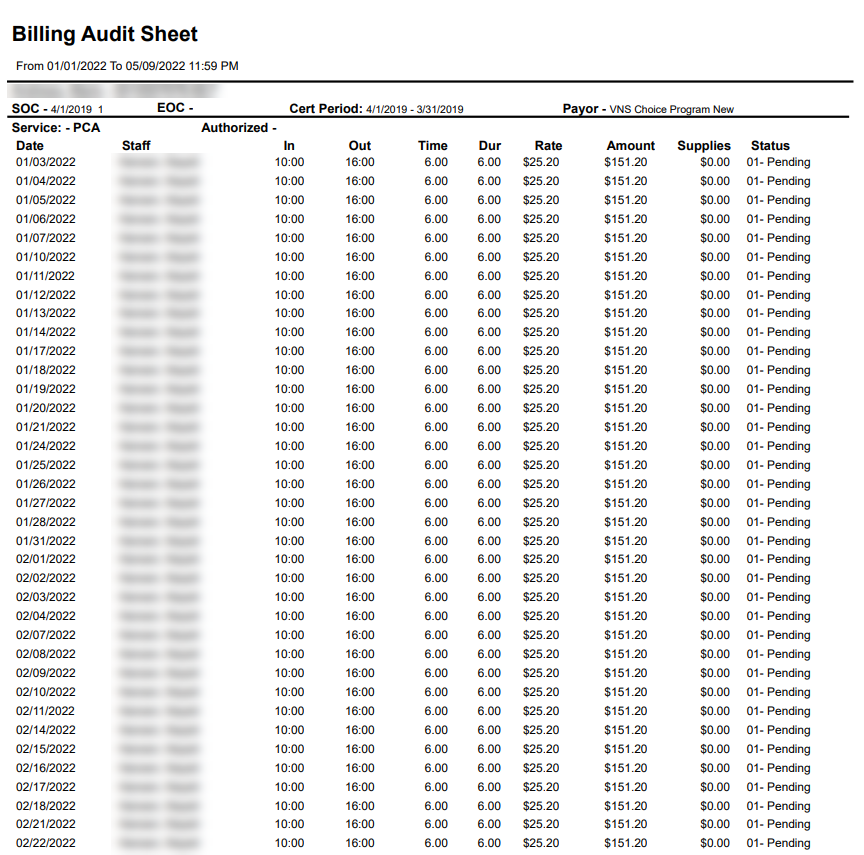
Description: This report displays a list of all visits associated with a client for a selected date range. The report includes the staff member, the visit’s call in and call out times, duration, rate, and billable amount.
Use: This report can be used to reference a visit performed for a client to ensure that it has been billed properly or to review staff member details for visits performed for a client.
Limitations: N/A
This report can be filtered by:
|
Field |
Description |
|---|---|
|
Company |
Use this dropdown to select the company. |
|
Location |
Use this dropdown to select the location. |
|
Admit Type |
Use this dropdown to select the admission type. |
|
Payor |
Use this dropdown to select the payor. |
|
Team |
Use this dropdown to select the team. |
|
Client |
Use this field to select the client.If a partial term is used, clients matching the entered term are included. |
|
Event Status |
Use this dropdown to select the event status. |
|
Date From |
Use this field to search for visits beginning on this date. |
|
Date To |
Use this field to search for visits ending on this date. |
Each column of the report displays:
|
Field |
Description |
|---|---|
|
Client Name |
Displays the client’s name. |
|
SOC |
Displays the client’s start of care date. |
|
EOC |
Displays the client’s end of care date. |
|
Cert Period |
Displays the client’s certification period. |
|
Payor |
Displays the client’s payor |
|
Service |
Displays the service being performed. |
|
Date |
Display’s the date of the visit. |
|
Staff |
Displays the staff member performing the visit. |
|
In |
Displays the visit call in time. |
|
Out |
Displays the visit call out time. |
|
Time |
Displays the total time of the visit. |
|
Dur |
Displays the duration of the visit. |
|
Rate |
Displays the billable rate of the service being performed. |
|
Amount |
Displays the billable amount for the visit. |
|
Supplies |
Displays the cost of any supplies used during the visit. |
|
Status |
Displays the visit’s status. |