Aged Invoices - Detailed Extended Report
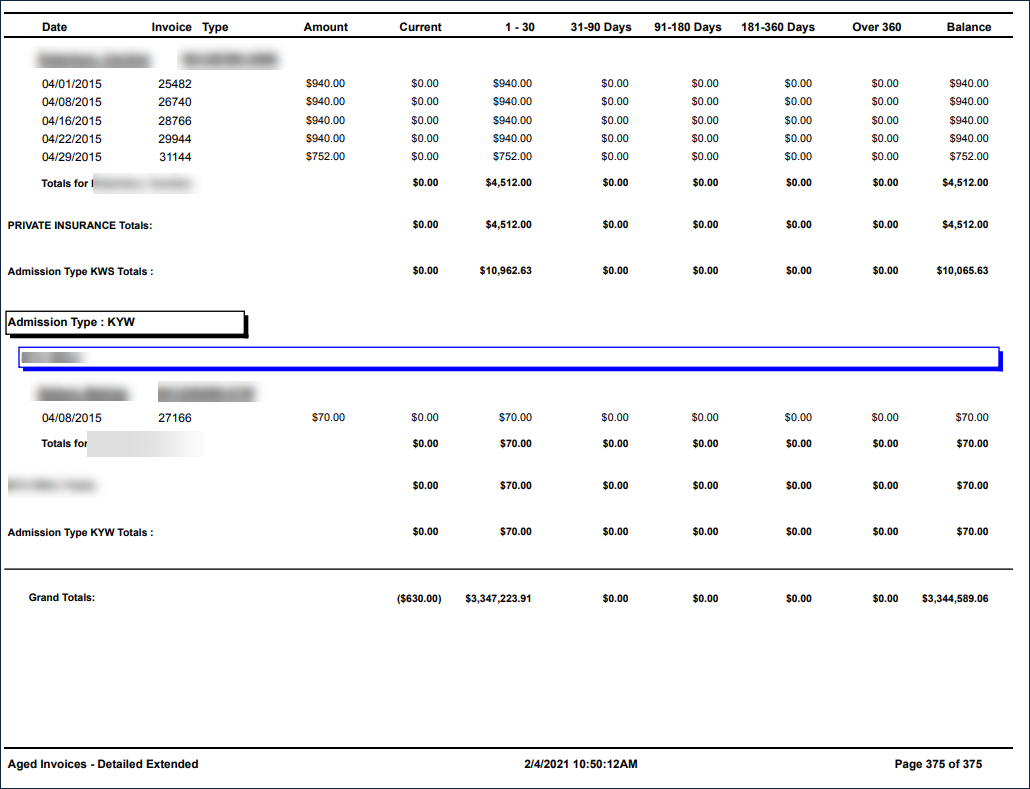
Description: This report provides a list of billed invoices that have a remaining balance in SAM, aged by bill date. Invoices with zero balances or that have not been billed are not included in this report.
Use: This report can be used to obtain a snapshot of outstanding invoices with any payment/adjustment history for a select date range.
Limitations: N/A
This report can be filtered by:
|
Field |
Description |
|---|---|
|
Company |
The selected company. |
|
Location |
The selected location. |
|
Admit Types |
The code for the client's admission. |
|
Team |
The selected team. |
|
Payors |
The selected payor. |
|
Include Clients |
Include clients in collection or not. |
|
Invoice Date From |
The first date in the selected range. |
|
Invoice Date To |
The last date in the selected range. |
|
Cash Applied Date From |
The first date cash was applied in the selected range. |
|
Cash Applied Date To |
The last date cash was applied in the selected range. |
Each column of the report displays:
|
Field |
Description |
|---|---|
|
Date |
The date of the invoice. |
|
Invoice |
The number displayed on the invoice. |
|
Type |
The method through which payment was received. |
|
Amount |
The amount of payment received. |
|
Current |
The current invoice balance. |
|
1-30 |
The invoice balance 1-30 days after billing. |
|
31-90 Days |
The invoice balance 31-90 days after billing. |
|
91-180 Days |
The invoice balance 91-180 days after billing. |
|
181-360 Days |
The invoice balance 181-360 days after billing. |
|
Over 360 |
The invoice balance over 360 days after billing. |
|
Balance |
The account balance before cash applied. |
|
Admission Type |
The code for the client's admission. |
|
Payor |
The client's payor. |
|
Totals |
The total balances for each client. |
|
Totals |
The total balances for each payor. |
|
Grand Totals |
The total balances on the entire report. |