Activity Report by Payor
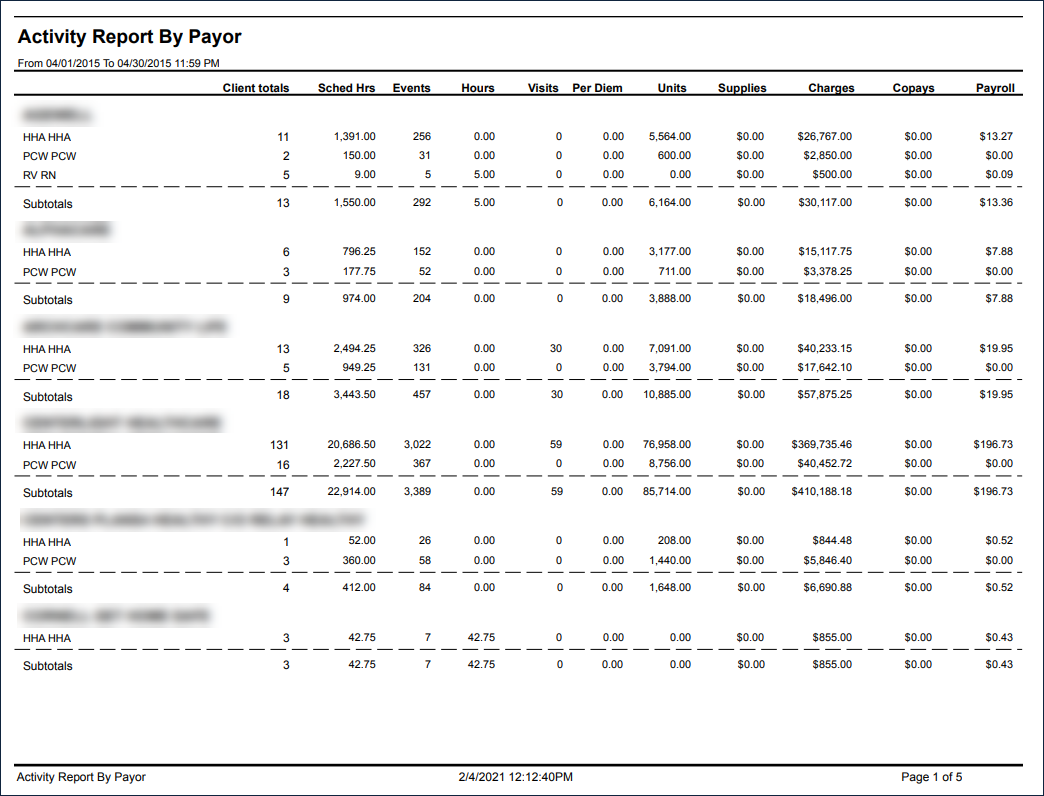
Description: This report displays a list of all billable services sorted by payer and service.
Use: This report can be used by the agency to view payer activity such as. the number of confirmed visits, which services are being provided or payments to employees.
Limitations: N/A
This report can be filtered by:
|
Field |
Description |
|---|---|
|
Company |
The selected company. |
|
Location |
The selected location. |
|
Admit Type |
The code for the client's admission. |
|
Service |
The selected service. |
|
Team |
The selected team. |
|
Payor |
The selected payor. |
|
Event Item Status |
The selected event item status. |
|
Date From |
The first date of a selected range of dates. |
|
Date To |
The last date of a selected range of dates. |
Each column of the report displays:
|
Field |
Description |
|---|---|
|
Payor |
The payor name. |
|
Service |
The code for the service provided. |
|
Client Totals |
The number of clients for the service. |
|
Sched Hrs |
The total scheduled hours for the service. |
|
Events |
The number of events. |
|
Hours |
The number of hours. |
|
Visits |
The number of events. |
|
Per Diem |
The per diem allowance. |
|
Units |
The hours for the service converted to units. Unit conversion varies by agency. |
|
Supplies |
The cost of supplies for the service. |
|
Charges |
The total charge for the service. |
|
Copays |
The copay for the event. |
|
Payroll |
The amount for the staff payroll. |
|
Subtotals |
Subtotals for all fields under each client. |
|
Report Totals |
Totals for all fields for the entire report. |