Payroll Review Screen
The Payroll Review screen can be used to review completed schedules and to confirm payable amounts and rates for staff members.
To access the Payroll Review screen, go to Main Menu > Payroll > Payroll Review.
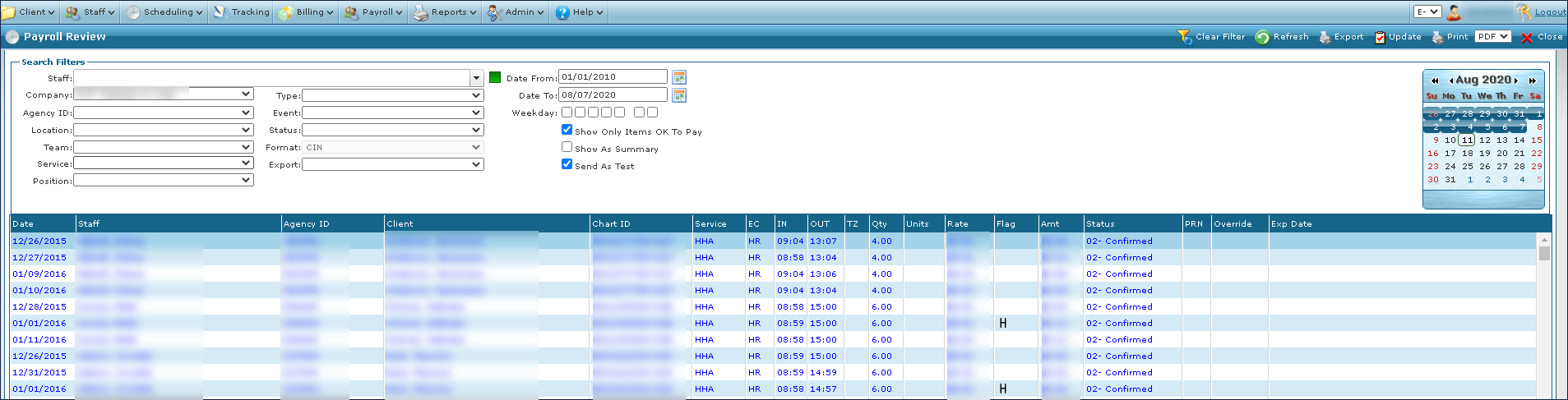
The Search Filters can be used to locate items needing review, correction, updating, approval and more.

|
Field |
Description |
|---|---|
|
Staff |
Use this field to filter by the staff member’s name. |
|
Company |
Use this dropdown to filter by company. |
|
Agency ID |
Use this dropdown to filter by agency identification number. |
|
Location |
Use this dropdown to filter by location. |
|
Team |
Use this dropdown to filter by team. |
|
Service |
Use this dropdown to filter by service. |
|
Position |
Use this dropdown to filter by position. |
|
Type |
Use this dropdown to filter by type. |
|
Event |
Use this dropdown to filter by event code. |
|
Status |
Use this dropdown to filter by status. |
|
Format |
Use this dropdown to select the format for exporting payroll. This dropdown does not filter the results. |
|
Export |
Use this dropdown to filter by previous export date and time. |
|
Date From |
Use this field to select the starting date of the range. |
|
Date To |
Use this field to enter the ending date of the range. |
|
Weekday |
Select these checkboxes to filter by day of the week. |
|
Show Only Items OK To Pay |
Select this checkbox to filter for items only marked OK to Pay. |
|
Show As Summary |
Select this checkbox to display a summary of payroll items by staff member. |
|
Send As Test |
Select this checkbox to send the payroll export as a test. |
The Results List displays all items matching the selected criteria in the search filters.

|
Field |
Description |
|---|---|
|
Date |
Displays the date of the event. |
|
Staff |
Displays the staff member assigned to the event. |
|
Agency ID |
Displays the staff member’s agency identification number. |
|
Client |
Displays the client associated with the payroll item. Some items do not have clients. |
|
Chart ID |
Displays the client’s chart identification number. |
|
Service |
Displays the service code associated with the schedule. |
|
EC |
Displays the event code associated with the line item. |
|
IN |
Displays the start time of the schedule. |
|
OUT |
Displays the end time of the schedule. |
|
TZ |
Displays the time zone associated with the client’s zip code. |
|
Qty |
Displays the quantity of the schedule. |
|
Units |
Displays the schedule duration in units. |
|
Rate |
Displays the rate applied to the line item. |
|
Flag |
Displays special pay situations such as holidays (H) or weekends (W). |
|
Amt |
Displays the amount calculated (Rate times Amt) for staff payroll. |
|
Status |
Displays the status of the staff payline. |
|
PRN |
Displays any PRN amounts associated with the schedule. |
|
Override |
Displays any overrides associated with the schedule. |
|
Exp Date |
Displays the date that the payroll item was exported. |