Sandata Agency Management 07-Client OASIS Export Screen
The Client Oasis Export screen is used to select client OASIS events to export for billing.
To access the Client Oasis Export screen, go to Main Menu > Client > Exports > Oasis Assessments.
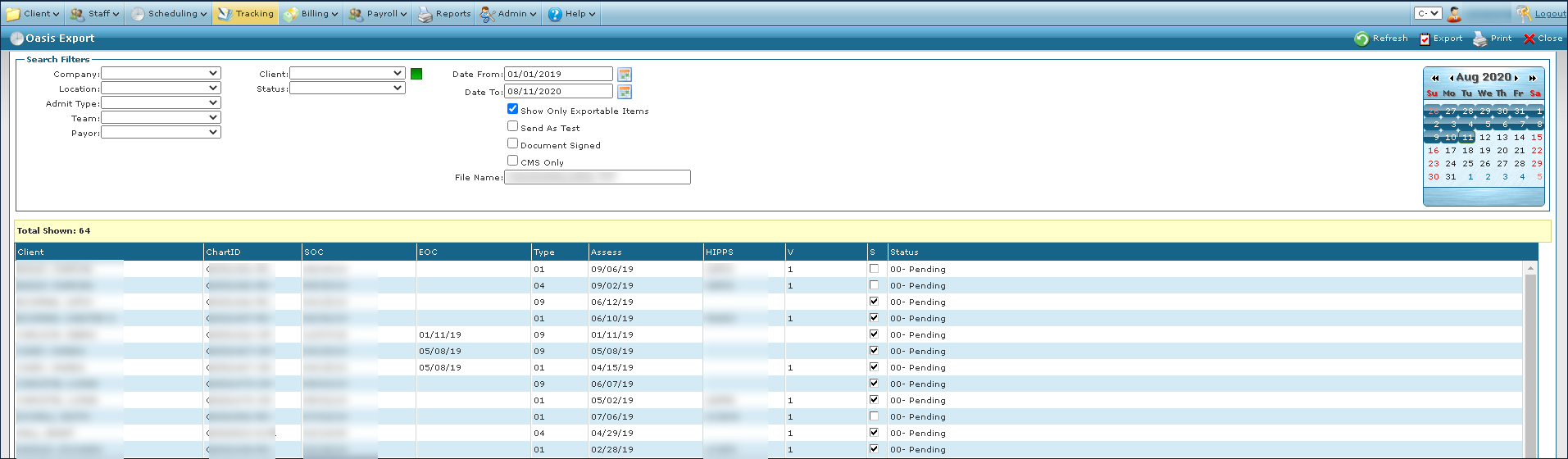
The Search Filters can be used to locate client OASIS events ready for export. Results matching the selected search items are displayed in the Results List below.

|
Field |
Description |
|---|---|
|
Company |
Use this drop down to filter by company. |
|
Location |
Use this drop down to filter by location. |
|
Admit Type |
Use this drop down to filter by admission type. |
|
Team |
Use this drop down to filter by team. |
|
Payor |
Use this drop down to filter by payer. |
|
Client |
Use this drop down to filter by client. |
|
Status |
Use this drop down to filter by status. |
|
Date From |
Use this field to select the beginning of the date range. |
|
Date To |
Use this field to select the ending of the date range. |
|
Show Only Exportable Items |
Select this checkbox to filter by only exportable items. |
|
Send As Test |
Select this check box to send the export as a test. |
|
Document Signed |
Select this check box to filter by OASIS assessments that have been signed by a clinician. |
|
CMS Only |
Select this check box to filter by Episodic and Skilled Medicaid OASIS assessments. |
|
File Name |
Use this field to enter the file name of the export. |
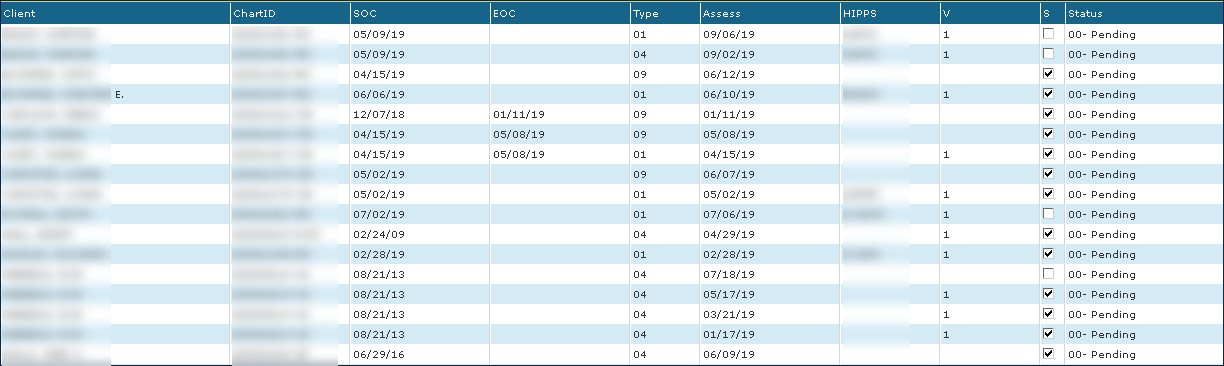
The Results List displays all items matching the selected search filters.
|
Field |
Description |
|---|---|
|
Client |
Displays the client’s name. |
|
ChartID |
Displays the client’s chart identification number. |
|
SOC |
Displays the client’s start of care date. |
|
EOC |
Displays the client’s end of care date. |
|
Type |
Displays the client’s admission type. |
|
Assess |
Displays the date that the OASIS assessment was completed. |
|
HIPPS |
Displays the client’s HIPPs code. |
|
V |
Displays the OASIS assessment validation indicator. |
|
S |
Displays if the OASIS assessment has been signed. |
|
Status |
Displays the status of the OASIS assessment. |