Sandata Agency Management 06-Referral Sources Screen
The Referral Sources screen contains the names and contact information of all referral sources that have been added to the system for usage on a client’s admission.
To access the Referral Sources screen, go to Main Menu > Client > Referral Sources.

The Search Flters allow users to locate referral sources.

|
Field |
Description |
|---|---|
|
Name |
Use this field to filter results by source name. |
|
Hide In-Active Sources |
Select this checkbox to remove any inactive sources from the results list. |
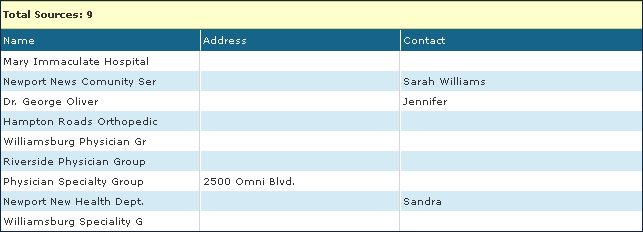
The Results List displays all items matching the selected criteria.
|
Field |
Description |
|---|---|
|
Name |
Displays the name of the referral source. |
|
Address |
Displays the primary address of the referral source. |
|
Contact |
Displays the name of the contact person if the referral source is not a person. |
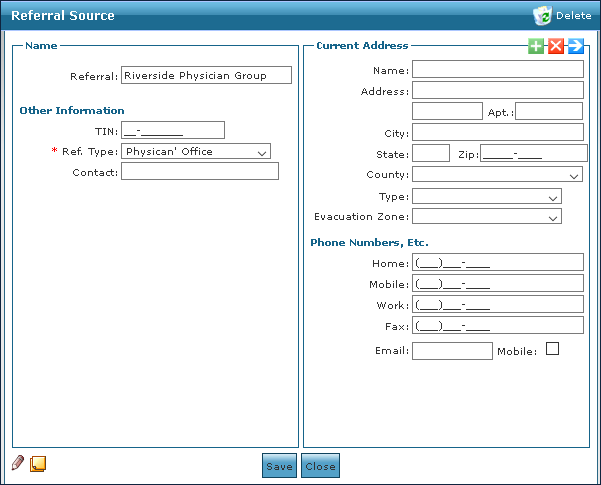
The Referral Source window contains the contact and address information for the selected referral source.
|
Field |
Description |
|---|---|
|
Referral |
Use this field to enter the name of the referral source. |
|
TIN |
Use this field to enter the tax identification number of the referral source. |
|
Ref. Type |
Use this drop down to select the referral type. |
|
Contact |
Use this field to enter the contact name if the referral source is not a person. |
|
Name |
Use this field to enter the name of the referral. |
|
Address |
Use this field to enter the address of the referral source. |
|
Apt |
Use this field to enter the apartment number of the referral source. |
|
City |
Use this field to enter the city name of the referral source. |
|
State |
Use this field to enter the state of the referral source. |
|
Zip |
Use this field to enter the zip code of the referral source. |
|
County |
Use this drop down to select the county of the referral source. |
|
Type |
Use this drop down to select the type of location of the referral source. |
|
Evacuation Zone |
Use this drop down to select the referral source’s designated evacuation zone. |
|
Home |
Use this field to enter the referral source’s home phone number. |
|
Mobile |
Use this field to enter the referral source’s cell phone number. |
|
Work |
Use this field to enter the referral source’s work phone number. |
|
Fax |
Use this field to enter the referral source’s fax number. |
|
|
Use this field to enter the referral source’s e-mail address. |
|
Mobile |
Select this checkbox to indicate if the referral source’s cell phone number is their preferred method of contact. |