Sandata Agency Management 13-Security Groups Window

The Security Groups window displays all options and fields associated with a security group within the system.
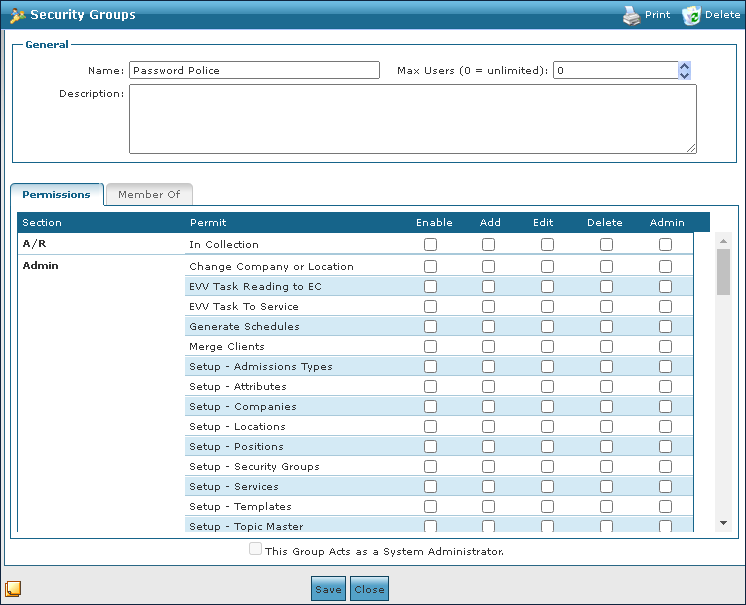
The General section on the Security Groups window displays the general information and settings for the security group.

|
Field |
Description |
|---|---|
|
Name |
Use this field to enter the name of the security group. |
|
Max Users |
Use this field to enter the maximum number of group members. |
|
Description |
Use this field to enter the security group description. |
|
This Group Acts as a System Administrator |
Select this checkbox to make this group a system administrator. |
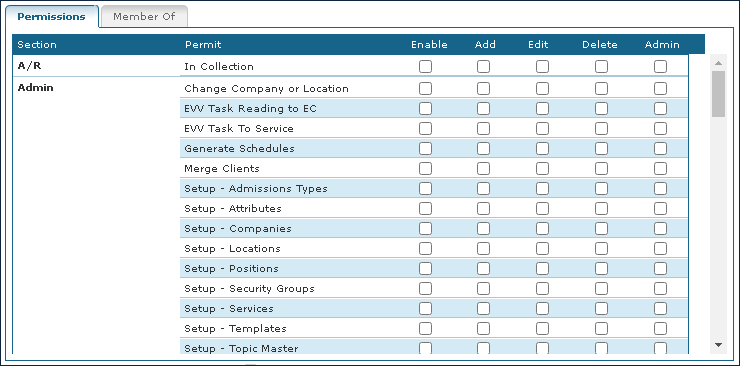
The Permissions tab on the Security Groups window displays the security group’s user permissions for different sections of the system.
|
Field |
Description |
|---|---|
|
Section |
Displays the section of the system. |
|
Permit |
Displays the name of the setting. |
|
Enable |
The Data can be accessed but cannot be modified or deleted. New Items cannot be created. |
|
Add |
The user can view the data and can also create new items. The user cannot modify or delete data. |
|
Edit |
The user can view the data and modify it. The user cannot add or delete data. |
|
Delete |
The user can view the data and delete it. The user cannot add or modify data. |
|
Admin |
Top Level Access. The user can view, add, edit and delete data. This access should be given sparingly. |
The A/R section of the Permissions tab on the Security Groups window displays settings.

|
Field |
Description |
|---|---|
|
In Collection |
Select these checkboxes to set permissions. |
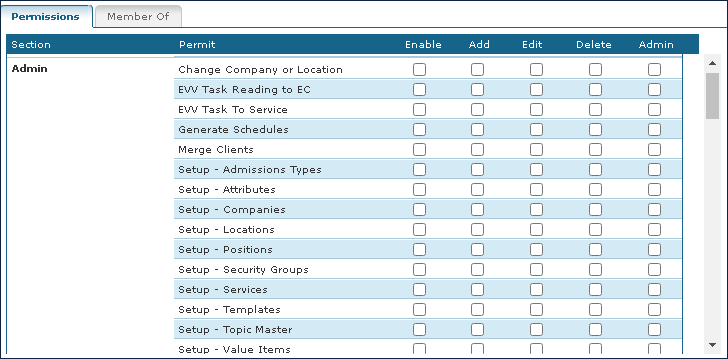
The Admin section of the Permissions tab on the Security Groups window displays the settings for various Administrator features in the system.
|
Field |
Description |
|---|---|
|
Change Company or Location |
Select these checkboxes to set permissions for changing company or location settings. |
|
EVV Task Reading to EC |
Select these checkboxes to set permissions for EVV task reading for event codes. |
|
EVV Task to Service |
Select these checkboxes to set permissions for EVV task to service settings. |
|
Generate Schedules |
Select these checkboxes to set permissions for generating schedules. |
|
Merge Clients |
Select these checkboxes to set permissions for merging clients. |
|
Setup – Admission Types |
Select these checkboxes to set permissions for setting up admission types. |
|
Setup – Attributes |
Select these checkboxes to set permissions for setting up attributes. |
|
Setup – Companies |
Select these checkboxes to set permissions for setting up companies. |
|
Setup – Locations |
Select these checkboxes to set permissions for setting up locations. |
|
Setup – Positions |
Select these checkboxes to set permissions for setting up positions. |
|
Setup – Security Groups |
Select these checkboxes to set permissions for setting up security groups. |
|
Setup – Services |
Select these checkboxes to set permissions for setting up services. |
|
Setup – Templates |
Select these checkboxes to set permissions for setting up templates |
|
Setup – Topic Master |
Select these checkboxes to set permissions for setting up topic masters. |
|
Setup – Value Items |
Select these checkboxes to set permissions for setting up value items. |
|
System Settings |
Select these checkboxes to set permissions for system settings. |
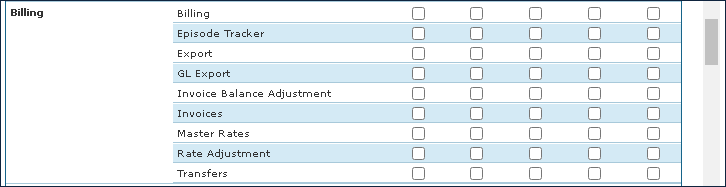
The Billing section of the Permissions tab on the Security Groups window displays the settings for the various parts in the Billing module in the system.
|
Field |
Description |
|---|---|
|
Billing |
Select these checkboxes to set permissions for the Billing window. |
|
Episode Tracker |
Select these checkboxes to set permissions for the Episode Tracker window. |
|
Export |
Select these checkboxes to set permissions for the Exports window. |
|
GL Export |
Select these checkboxes to set permissions for GL Exports. |
|
Invoice Balance Adjustment |
Select these checkboxes to set permissions for the Balance Adjustment window. |
|
Invoices |
Select these checkboxes to set permissions for the Invoices window. |
|
Master Rates |
Select these checkboxes to set permissions for the Master Rates window. |
|
Rate Adjustment |
Select these checkboxes to set permissions for the Rate Adjustment window. |
|
Transfers |
Select these checkboxes to set permissions for transfers. |
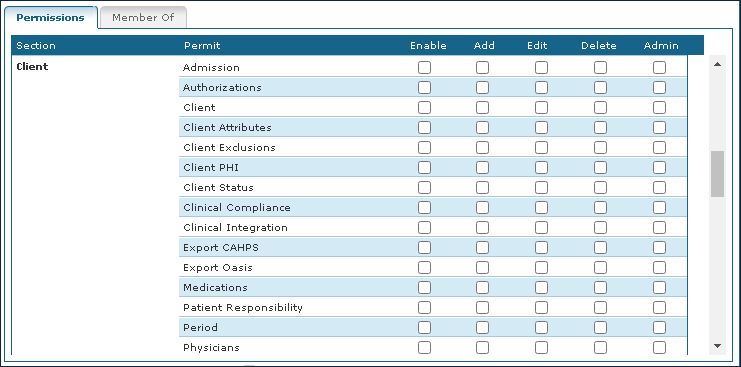
The Client section of the Permissions tab on the Security Groups window displays the settings for the various screens in the Client module in the system.
|
Field |
Description |
|---|---|
|
Admission |
Select these checkboxes to set permissions for Client admissions. |
|
Authorizations |
Select these checkboxes to set permissions for Client authorizations. |
|
Client |
Select these checkboxes to set permissions for Clients. |
|
Client Attributes |
Select these checkboxes to set permissions for Client attributes. |
|
Client Exclusions |
Select these checkboxes to set permissions for Client exclusions. |
|
Client PHI |
Select these checkboxes to set permissions for Client private health information. |
|
Client Status |
Select these checkboxes to set permissions for Client status. |
|
Clinical Compliance |
Select these checkboxes to set permissions for clinical compliance. |
|
Clinical Integration |
Select these checkboxes to set permissions for clinical integration. |
|
Export CAHPS |
Select these checkboxes to set permissions for exporting CAHPS information. |
|
Export Oasis |
Select these checkboxes to set permissions for exporting OASIS information. |
|
Medications |
Select these checkboxes to set permissions for Client medications. |
|
Patient Responsibility |
Select these checkboxes to set permissions for Client patient responsibility. |
|
Period |
Select these checkboxes to set permissions for Client periods. |
|
Physicians |
Select these checkboxes to set permissions for Client physicians. |
|
Plan of Care |
Select these checkboxes to set permissions for Client plan of cares. |
|
Reassign Client Manager / Coordinator |
Select these checkboxes to set permissions for reassigning Client managers or coordinators. |
|
Referral Sources |
Select these checkboxes to set permissions for Client referral sources. |
|
Services |
Select these checkboxes to set permissions for Client services. |
The Documents section of the Permissions tab on the Security Groups window displays the settings for the various document windows in the system.

|
Field |
Description |
|---|---|
|
Documents - Admissions |
Select these checkboxes to set permissions for documents associated with admissions. |
|
Documents - Clients |
Select these checkboxes to set permissions for documents associated with clients. |
|
Documents - Periods |
Select these checkboxes to set permissions for documents associated with periods. |
|
Documents - Schedules |
Select these checkboxes to set permissions for documents associated with schedules. |
|
Documents - Staff |
Select these checkboxes to set permissions for documents associated with staff. |
|
Documents - Tracking |
Select these checkboxes to set permissions for documents associated with tracking. |
The Payor section of the Permissions tab on the Security Groups window displays the settings for various payer settings.

|
Field |
Description |
|---|---|
|
Clone Rates |
Select these checkboxes to set permissions for cloning rates. |
|
Payor |
Select these checkboxes to set permissions for the Payor screen. |
|
Payor EDI |
Select these checkboxes to set permissions for Payer EDI information. |
|
Payor Exclusions |
Select these checkboxes to set permissions for Payer exclusions. |
|
Rate Plan |
Select these checkboxes to set permissions for Payer rate plans. |
The Payroll section of the Permissions tab on the Security Groups window displays the settings for payroll review in the system.

|
File |
Description |
|---|---|
|
Payroll Review |
Select these checkboxes to set permissions for payroll review. |
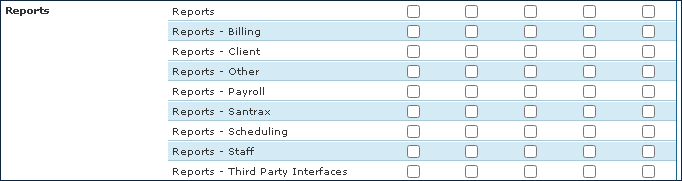
The Reports section of the Permissions tab on the Security Groups window displays the settings for various reports that can be run in the system.
|
Field |
Description |
|---|---|
|
Reports |
Select these checkboxes to set permissions for the Reports window. |
|
Reports – Billing |
Select these checkboxes to set permissions for billing reports. |
|
Reports – Client |
Select these checkboxes to set permissions for Client reports. |
|
Reports – Other |
Select these checkboxes to set permissions for other reports. |
|
Reports – Payroll |
Select these checkboxes to set permissions for payroll reports. |
|
Reports – Santrax |
Select these checkboxes to set permissions for Santrax reports. |
|
Reports – Scheduling |
Select these checkboxes to set permissions for scheduling reports. |
|
Reports – Staff |
Select these checkboxes to set permissions for staff reports. |
|
Reports – Third Party Interfaces |
Select these checkboxes to set permissions for third-party interface reports. |
The Santrax section of the Permissions tab on the Security Groups window displays the settings for Santrax Maintenance.

|
Field |
Description |
|---|---|
|
Maintenance |
Select these checkboxes to set permissions for the Santrax Maintenance window. |
The Schedules section of the Permissions tab on the Security Groups window displays the settings related to scheduling.

|
Field |
Description |
|---|---|
|
Access Invoice |
Select these checkboxes to set permissions for accessing invoices. |
|
Copy Forward |
Select these checkboxes to set permissions for copying schedules forward. |
|
Edit Duration |
Select these checkboxes to set permissions for editing schedule durations. |
|
Mass Edit |
Select these checkboxes to set permissions for mass editing schedules. |
|
Overtime |
Select these checkboxes to set permissions for approving overtime on schedules. |
|
Schedules |
Select these checkboxes to set permissions for the Schedules window. |
|
TT Pay |
Select these checkboxes to set permissions for TT pay. |
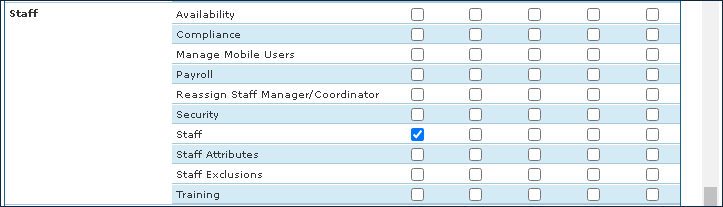
The Staff section of the Permissions tab on the Security Groups window displays the settings related to Staff features.
|
Field |
Description |
|---|---|
|
Availability |
Select these checkboxes to set permissions for Staff availability. |
|
Compliance |
Select these checkboxes to set permissions for Staff compliance. |
|
Manage Mobile Users |
Select these check boxes to set permissions for managing mobile users. |
|
Payroll |
Select these checkboxes to set permissions for payroll. |
|
Reassign Staff Manager/Coordinator |
Select these checkboxes to set permissions for reassigning Staff Managers or coordinators. |
|
Security |
Select these checkboxes to set permissions for security. |
|
Staff |
Select these checkboxes to set permissions for the Staff window. |
|
Staff Attributes |
Select these checkboxes to set permissions for staff attributes. |
|
Staff Exclusions |
Select these checkboxes to set permissions for Staff exclusions. |
|
Training |
Select these checkboxes to set permissions for the Staff Training window. |
The Templates section of the Permissions tab on the Security Groups window displays the settings for creating or modifying templates in the system.

|
Field |
Description |
|---|---|
|
Templates |
Select these check boxes to set permissions for templates. |
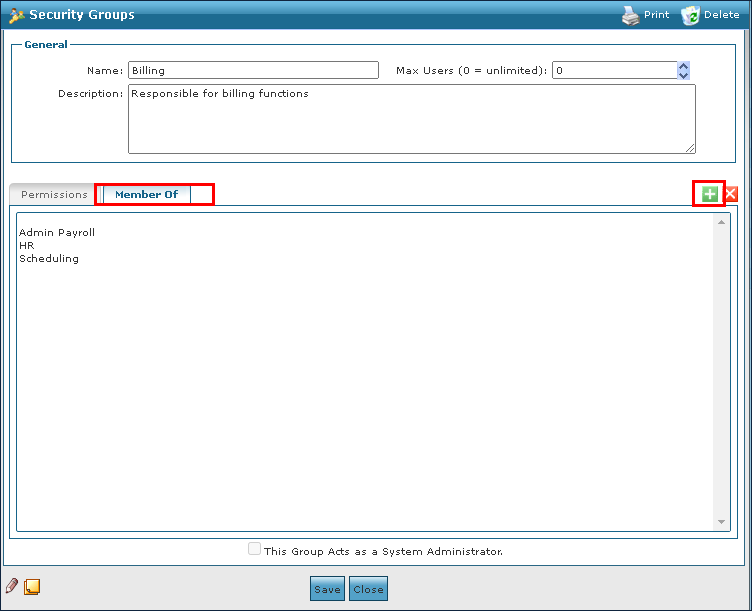
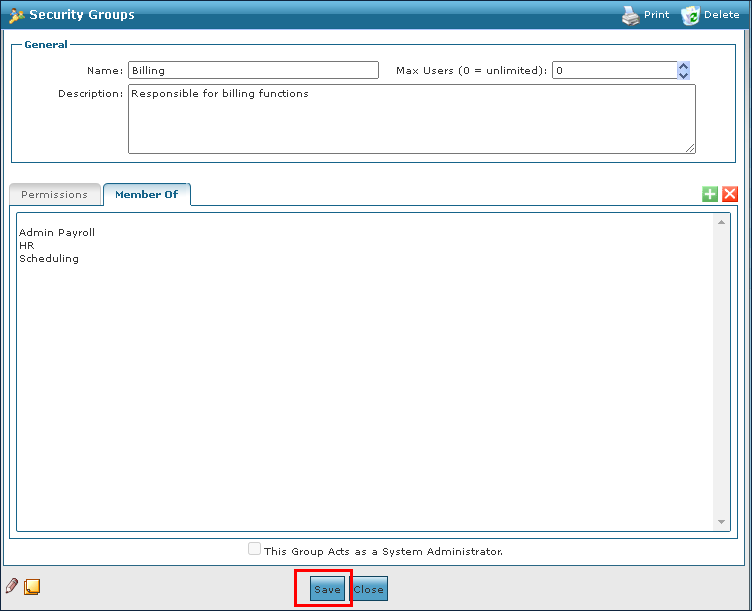
The Member Of tab displays all other security groups that the group is a member of.

To associate a security group with existing groups:
-
Go to the Security Group window under Main Menu > Admin > System Setup > Security Groups.
-
Double click the selected security group.

-
Select the Member Of tab.
-
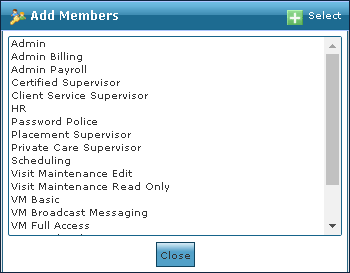
Select the Add icon.
-
5. Select the new group.
-
Select the Save button.
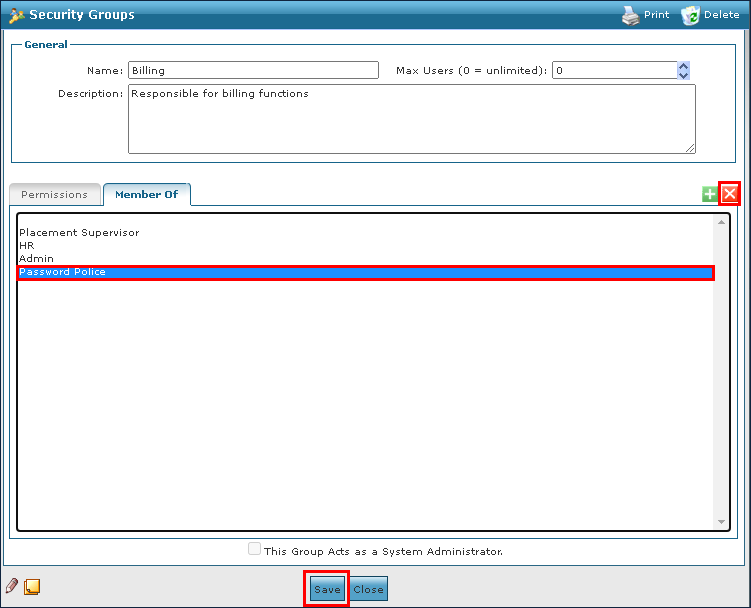
To deassociate a security group from an existing group:
-
Go to the Security Group window underMain Menu > Admin > System Setup > Security Groups.
-
Double click the selected security group.

-
Select the Member Of tab.
-
Select the group to be removed.
-
Select the Delete icon.
-
Select the Save button.
The Synchronization section of the Permissions tab on the Security Groups window displays the settings related to refreshing or syncing the system.

|
Field |
Description |
|
Perform Sync |
Select these checkboxes to set permissions for performing system syncing. |