Compliance Documents in Staff Member Profiles

To add a new compliance document to a staff member’s profile:
-
Go to Main Menu > Staff.
-
Locate and double click on the staff member using the search filters.
-
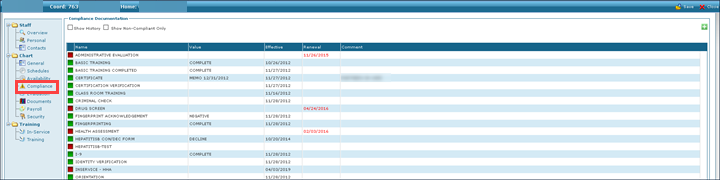
Click Compliance.
-
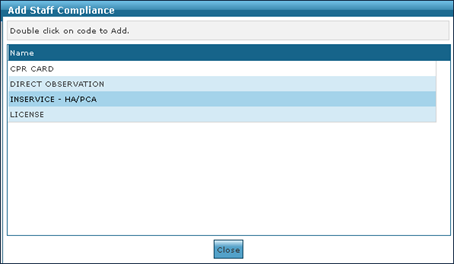
Click the green + button. This opens the Add Staff Compliance window.
-
Click the document to be added.
To edit an existing compliance document on a staff member’s profile:
-
Go to Main Menu > Staff.
-
Locate and double click on the staff member using the search filters.
-
Click Compliance.
-
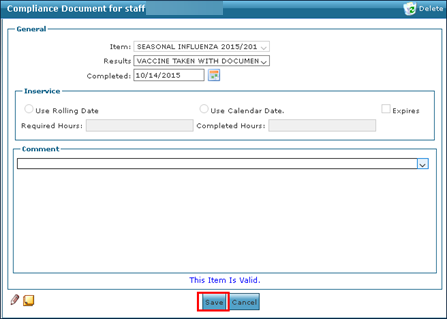
Double click on the document to be edited.
-
Edit the information as needed and click Save.
To remove a compliance document:
-
Go to Main Menu > Staff.
-
Locate and double click on the staff member using the search filters.
-
Click Compliance.
-
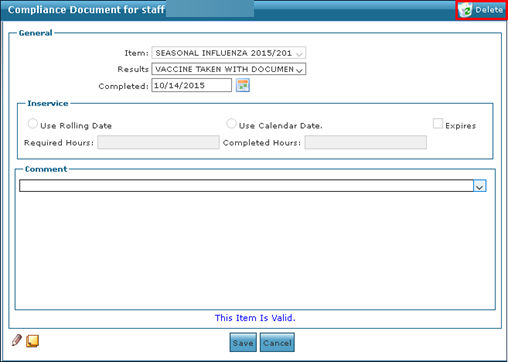
Double click on the document to be removed.
-
Click Delete.
To view all staff member compliance documentation regardless of expiration:
-
Go to Main Menu > Staff.
-
Locate and double click on the staff member using the search filters.
-
Click Compliance.
+ -
Click Show History. This displays all compliance documents on the staff member’s profile.