Mass Edit Schedules
The Mass Edit feature is used to make changes to different parts of a schedule including the Event Code, Staff Member, Times or Status. This feature is available from several screens, such as Client Schedules and Scheduling Overview.
To Mass Edit schedules:
-
Use the search filters to locate the schedules being changed on the screen.
-
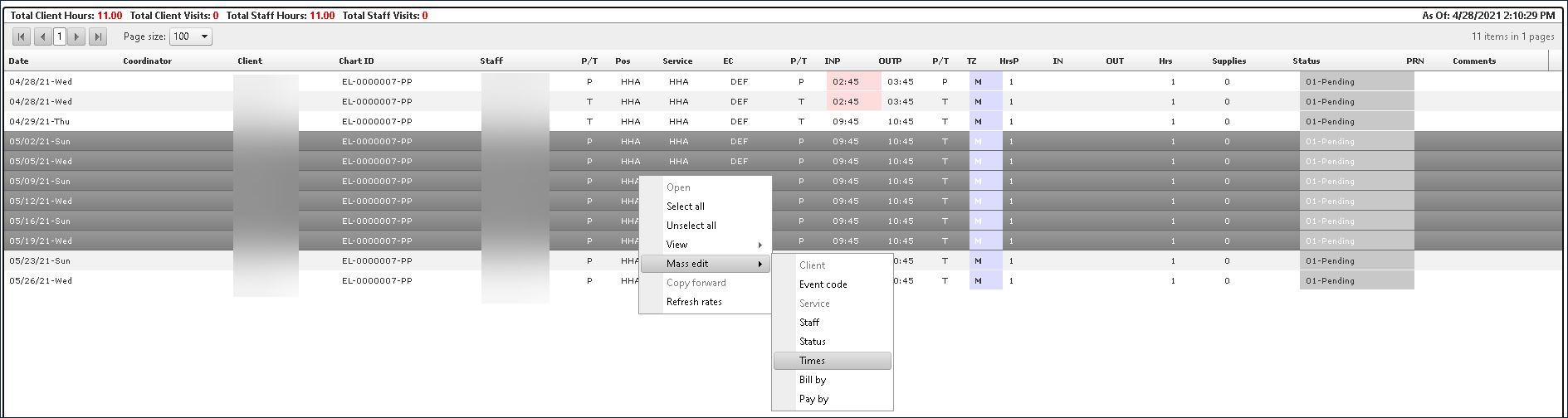
Select the schedules to be changed.
Multiple schedules can be selected by pressing and holding <Ctrl> and clicking on the desired schedules or pressing and holding <Shift> and selecting the first and last schedule.
-
Right click on the schedules, click Mass Edit and select the schedule setting to be edited.
-
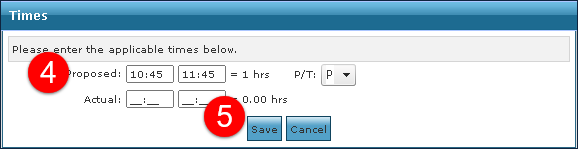
Enter the new changes, as necessary.
Select P if the change is permanent to update the permanent schedule template for all schedules generated in the future.
-
Click Save.
Select a Reason Code if required.